

In a manufacturing environment, “the internet is down” isn’t just annoying; it can halt shipping, break barcode scanning, disrupt ERP/MES visibility, knock out VoIP phones, and create real downtime on the floor. Add modern operations (cloud ERP, Microsoft 365/Google Workspace, remote vendor support, connected equipment, tablets on carts, and real-time inventory), and network reliability becomes a production issue.
For small and mid-sized manufacturers across Wisconsin, whether you’re in Madison, Milwaukee, Green Bay, the Fox Valley, or serving rural industrial parks, the goal is the same: secure, predictable connectivity with a plan for when something fails. Below is a practical, security-first blueprint for plant network infrastructure, Wi-Fi, and business internet with failover, supporting both office users and shop-floor workflows.
What makes manufacturing networks different?
Most offices need “fast internet.” Manufacturers need fast internet and dependable, low-latency connectivity across mixed environments: front office, warehouse, production floor, and often multiple buildings. A few realities we see often in Wisconsin plants:
- Downtime is expensive. Lost network connectivity can stop picking/packing, shipping labels, time clocks, and production reporting.
- OT and IT must coexist. PLCs, HMIs, SCADA/MES, and industrial PCs often share physical space (and sometimes networks) with standard user devices.
- RF is challenging. Metal racks, machinery, forklifts, and moving inventory create reflections and dead zones that don’t exist in typical offices.
- Vendors need access. Remote support for equipment and controls is common, and it must be tightly controlled and logged.
- Outages don’t wait for “after hours.” Second and third shifts still need stable Wi-Fi, phones, and system access.
That’s why we recommend treating the plant network like a utility: designed, documented, monitored, and resilient by default.
The foundation: wired network design built for uptime
Wi‑Fi gets attention because it’s visible, but your wired LAN is what keeps everything stable, especially in industrial environments. The most common problems we inherit are “it grew organically” networks: unmanaged switches, unknown cabling, no documentation, and consumer gear patched into critical areas.
1) Structured cabling and a clean physical layout
Reliability and fast troubleshooting start with the basics:
- Cat6/Cat6A where it matters (office drops, APs, VoIP phones, workstations, barcode printer stations, IDF/MDF uplinks).
- Fiber between buildings/IDFs where distance, electrical noise, or lightning risk makes copper a bad bet.
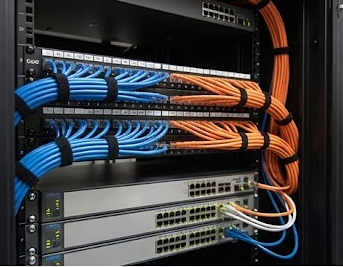
- Proper rack layout with patch panels, labeling, and cable management, so maintenance doesn’t turn into guesswork.
- Documentation that maps ports, VLANs, switch stacks, and device locations (including floor drops and enclosure IDs).
2) Business-grade switching with segmentation (OT/IT aware)
Segmentation (usually with VLANs) is one of the simplest ways to reduce risk and prevent “everything can talk to everything.” In manufacturing, it’s also a practical way to keep shop-floor devices stable while protecting corporate systems.
Common segmentation approach for plants:
- Corporate/Staff VLAN (office workstations and standard user devices)
- OT/Controls VLAN (PLCs, HMIs, SCADA components, industrial PCs)
- Warehouse/Handhelds VLAN (RF scanners, tablets, cart PCs)
- Printers/Labelers VLAN (including thermal label printers, often overlooked)
- VoIP VLAN (desk phones, paging, softphone endpoints)
- Guest Wi‑Fi VLAN (internet-only, isolated—useful for visiting drivers/vendors)
- Management VLAN (for network device administration and monitoring)
This structure supports security (reducing lateral movement and limiting vendor reach) and performance (prioritizing voice, scanning, and business-critical traffic).

Plant-ready Wi‑Fi: design for coverage, roaming, and RF reality
Many facilities treat Wi‑Fi as “add a few access points and hope.” In a warehouse or production floor, that approach leads to dead zones, sticky roaming, and scanner dropouts. Plant Wi‑Fi should be designed for predictable coverage, device density, and security controls.
1) Start with a Wi‑Fi site survey (or predictive design)
Warehouses and plants are hostile to RF. Metal shelving, machinery, and changing inventory levels can dramatically alter signal patterns. A site survey helps answer:
- Where do we need strong coverage (dock doors, pick aisles, staging, production cells, maintenance areas)?
- Where is interference coming from (neighbor networks, legacy 2.4 GHz devices, cordless equipment, microwave links)?
- How many access points do we actually need and where should they be mounted (including height and antenna choice)?
The result is fewer scanners disconnects, fewer “it works over here but not over there” tickets, and more stable mobile workflows.
2) Use business Wi‑Fi security controls (beyond a shared password)
Plants often have a mix of managed devices and “special” endpoints that can’t do modern authentication. A practical security-first approach typically includes:
- WPA3 was supported, with strong encryption standards.
- Separate SSIDs for corporate, OT/warehouse devices, and guests (at minimum).
- 802.1X/certificate-based access for staff devices where possible, so a leaked password doesn’t expose the facility network.
- Device isolation and firewall rules so handhelds and guests can’t reach sensitive systems.
Security-first Wi‑Fi is about making the secure path the default path, without slowing down the floor.
3) Make Wi‑Fi reliable for scanning, VoIP, and real-time apps
Barcode scanning, voice, and real-time MES/ERP workflows are sensitive to latency, jitter, and roaming behavior. The fix is not just “buy faster internet.” You also need:
- Proper AP density to avoid overloaded radios in high-activity zones
- Roaming tuned for mobility (forklifts, pickers, supervisors walking the floor)
- quality of service where appropriate for voice/paging and priority applications
- Band planning (often steering modern clients to 5/6 GHz while supporting legacy 2.4 GHz devices intentionally)
Business internet with failover: keep the plant running through ISP issues
Even the best ISP has outages—fiber cuts, upstream issues, local equipment failures, and weather events happen. In Wisconsin, storms and construction seasons can be disruptive. The solution is planned redundancy that automatically fails over.
1) Choose the right primary circuit for operations
Start with a circuit appropriate for your workload and location. Options vary by area, but typically include fiber, cable, or fixed wireless. For many manufacturers, key requirements are:
- Business-class support and SLAs (where available)
- Enough upload for cloud ERP, backups, video meetings, and vendor support sessions
- Static IPs if needed for VPNs, allowlisting, or hosted integrations

2) Add a true secondary path (independent from the primary)
Failover works best when the backup is independent:
- Different ISP (ideally with a different last-mile route)
- Different medium (e.g., fiber primary + 5G/LTE backup, or cable primary + fixed wireless backup)
The goal is to avoid a single neighborhood/building/provider failure that takes both links down.
3) Use a firewall/SD‑WAN setup that can fail over automatically
Failover shouldn’t require someone to notice the outage, call IT, and wait. A business firewall with dual-WAN or SD‑WAN can:
- Monitor link health (latency, loss, DNS reachability)
- Switch automatically to the backup circuit
- Restore cleanly when the primary returns
This matters for shipping systems, VoIP phones, cloud ERP/MES, and remote support.
4) Decide what “must stay up” during failover
Not every service needs the same priority. Decide in advance:
- Do shipping labels and carrier integrations need to remain fully functional?
- Do scanners/tablets need uninterrupted access to WMS/ERP?
- Do vendor VPN sessions need to stay stable for critical equipment?
- Should background sync/updates pause on the backup link?
A good design includes traffic shaping, so the backup link keeps core operations running rather than saturating it with nonessential traffic.
Security-first networking for manufacturing: reduce risk without breaking production
Manufacturers are frequently targeted with phishing, credential theft, and ransomware. OT environments pose risks because some control systems can’t be patched quickly, and availability is paramount. Your network can reduce exposure when paired with layered controls:
- Next-gen firewall policies (least privilege between OT and IT, geo/IP restrictions where appropriate)
- Secure remote access (VPN with MFA, or tightly scoped, time-bound access for vendors)
- DNS/web filtering to reduce malware and phishing impact
- Continuous monitoring for device health, unusual traffic, and firmware/lifecycle risks
- Network visibility so you know what’s actually on the floor (including “mystery” switches and APs)
The goal is not to “lock everything down” at the expense of uptime—it’s to build a network that is stable, observable, and recoverable.

A practical checklist for Wisconsin manufacturers (quick self-audit)
- Do you have two independent internet connections? If not, you’re one outage away from disruption.
- Is failover automatic and tested? “We think it should switch” is not a plan.
- Is OT separated from corporate and guest networks? Flat networks increase risk and troubleshooting time.
- Is warehouse Wi‑Fi designed (not guessed)? If scanners drop or roam poorly, start with a survey/design.
- Are network devices centrally managed and updated? Firmware/lifecycle gaps are common entry points.
- Do you know what’s plugged in? Unmanaged switches and extenders create blind spots and instability.
How No Limit Systems helps Wisconsin manufacturing teams
No Limit Systems (NLS) is based in Madison and supports organizations across Wisconsin with security-first network infrastructure: LAN/WAN design, plant Wi‑Fi planning and optimization, business internet and ISP coordination, OT/IT segmentation, and failover/SD‑WAN configurations. We focus on practical outcomes: fewer outages, smoother operations across shifts, and a network built to support both production and business systems.
Next step: get a clear plan (not a sales pitch)
If you’re unsure whether your facility can withstand an ISP outage—or you’re dealing with unreliable warehouse Wi‑Fi, start with a quick assessment and a prioritized set of fixes.
Book a 10–15-minute discovery call with an engineer to review your current internet setup, Wi‑Fi pain points, and failover options for your Wisconsin location. We’ll help you identify the highest-impact improvements, whether you implement them with NLS or not.