

Consulting and professional services firms in Wisconsin have a unique cybersecurity problem: your business runs on client trust, email, and documents. You collaborate quickly, share files with external parties, and move money and decisions based on messages that look routine.
That workflow is exactly why attackers target firms like yours. They do not need to “hack the server” in a dramatic movie way. They just need to compromise one mailbox, one laptop, or one vendor relationship, then quietly use your reputation to steal funds or extract sensitive data.
This month’s security-first risk management guide is built for owners, executives, and ops/IT leaders at small and mid-sized Wisconsin consulting firms. It is intentionally practical: controls you can measure, evidence you can produce for cyber insurance, and protections that do not wreck productivity.
What “risk management” means for professional services (without the jargon)
Risk management is not a binder on a shelf. For a professional services firm, it is a repeatable way to answer three questions:
- What can realistically go wrong? (phishing, ransomware, account takeover, vendor impersonation)
- How bad would it be? (financial loss, client churn, downtime during deadlines, legal exposure)
- What controls reduce the odds and the impact? (identity, email, endpoint, backup, monitoring, training)
The goal is not perfect security. The goal is to become a hard target while keeping client work moving.
The real threats we see hit Wisconsin consulting and advisory firms
1) Phishing and business email compromise (BEC)
BEC is the modern “bank heist” for professional services. An attacker gets into a mailbox (often via reused passwords or weak MFA), watches normal email threads, and then sends a believable request: “We changed bank accounts,” “Please wire the retainer here,” or “Send that signed agreement ASAP.”
Because the email is coming from a real account, or a near-perfect lookalike domain, it bypasses a lot of human skepticism.
2) Account takeover in Microsoft 365 or Google Workspace
Once one account is compromised, attackers often create forwarding rules, register new MFA methods, and expand access through shared drives or SharePoint/Drive links. Data can leak quietly for weeks before anyone notices.
3) Ransomware timed for peak deadlines
Ransomware crews understand leverage. For professional services, leverage is when you cannot afford downtime: month-end, quarter-end, audit deadlines, tax season, major client deliverables. They may also attempt double extortion by stealing data first, then encrypting systems.
A security-first risk management framework that fits SMB consulting firms
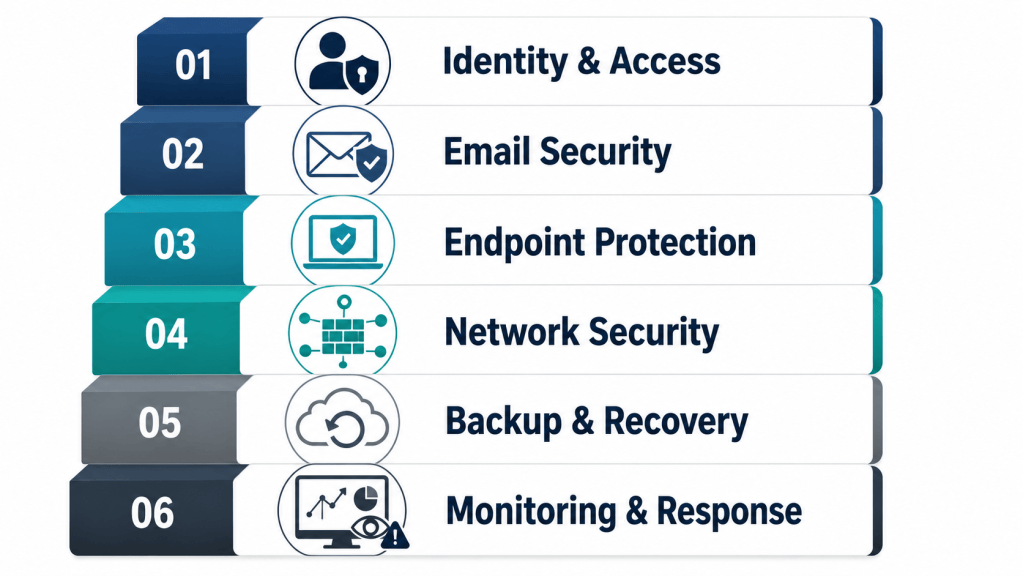
At No Limit Systems (based in Monona, serving Madison and surrounding Wisconsin counties), we approach risk management as layered defense plus evidence you can prove. Here is the model we recommend.
Step 1: Identify your “crown jewels” (in plain English)
For most consulting and professional services firms, the crown jewels are predictable:
- Client documents (contracts, strategy decks, financials, tax files, HR items)
- Email threads that authorize work, payments, or sensitive decisions
- Credentials to SaaS tools (CRM, accounting platforms, project systems)
- Personally identifiable information (PII), often present even when you are not “regulated”
Document where that data lives (M365/Google Workspace, laptops, file server/NAS, industry apps), who needs access, and what “normal sharing” looks like.
Step 2: Reduce your biggest risk fastest: identity and access
In professional services, identity is the new perimeter. If attackers cannot get in, or cannot stay in, most incidents end early.
- Enforce MFA everywhere (email, VPN/remote access, admin portals, financial apps). Avoid SMS where possible; use authenticator apps or hardware keys for high-risk roles.
- Conditional access (where available): block sign-ins from impossible locations, risky devices, or legacy authentication.
- Least privilege: no daily-use admin accounts. Separate admin roles and require stronger MFA.
- Quarterly access reviews: verify who still needs access to shared drives, client folders, and key SaaS tools.
If you do only one thing this quarter, do this. It directly reduces account takeover and BEC.
Step 3: Make email harder to impersonate (and easier to verify)
Email is both your primary workflow tool and your primary attack surface.
- Implement SPF, DKIM, and DMARC to reduce domain spoofing and improve deliverability of legitimate mail.
- Impersonation protection for executives and finance roles (display name spoofing is common).
- External sender banners and “first time sender” warnings to slow down social engineering.
- Disable auto-forwarding to external addresses unless there is a documented business case.
Then pair the technology with one simple process control: out-of-band verification for payment changes. If a bank account changes, confirm via a known phone number or a second channel. This one step prevents an outsized amount of loss.
Step 4: Lock down endpoints (because laptops are the office)
Your team’s laptops are where email, documents, and saved sessions live. Endpoint controls are the difference between a contained event and a firm-wide outage.
- EDR (endpoint detection and response) on every workstation and server, tuned and monitored.
- Patch management for Windows/macOS plus third-party apps (browsers, PDF tools, Java, conferencing apps).
- Disk encryption and device health baselines (screen lock, firewall enabled).
- Remove local admin rights for day-to-day users; use elevation tools when needed.

Step 5: Assume ransomware happens, build recovery that works
Backups that “exist” are not the same as backups that can restore your business under pressure.
- Immutable backups (protected from deletion) for critical systems and file storage.
- Cloud backup for Microsoft 365/Google Workspace (mailboxes and files), not just local sync.
- Quarterly restore testing: pick a real folder, a real mailbox, or a real server and prove you can restore it within a defined time.
If you cannot put a number on your RTO/RPO (how fast you can recover, and how much data you can afford to lose), you do not have a recovery plan. You have hope.
Step 6: Monitoring and response (managed, not just installed)
Small and mid-sized firms rarely have staff watching alerts all day. That is normal. The risk is buying tools that generate noise but never trigger action.
- Centralized alerting across identity, email, and endpoints.
- Same-day response expectations for critical security incidents.
- Monthly reporting that leadership can understand: what was blocked, what was risky, what changed, what is next.
Security has to operate like an ongoing business function, not a one-time project.
Cyber insurance and compliance: answer questions truthfully (and confidently)
Even if you are not pursuing a formal certification, insurers and client procurement teams increasingly ask for proof: MFA enforcement, EDR coverage, backup design, incident response planning, and security training.
A security-first approach to risk management includes evidence support: screenshots, policy artifacts, access review logs, and restore test records. This reduces renewal surprises and helps you respond to questionnaires without scrambling.
If you operate under specific requirements (for example, HIPAA-adjacent data, payment card environments, or Wisconsin breach notification considerations), build your controls around a recognized framework like NIST CSF, and keep documentation lightweight but current.
A practical 30-day risk reduction plan (for busy firm leaders)
- Week 1: Enforce MFA everywhere; block legacy authentication; remove unused accounts.
- Week 2: Implement SPF/DKIM/DMARC; add executive impersonation protection; turn off external auto-forwarding.
- Week 3: Confirm EDR coverage and patch cadence; remove local admin; encrypt devices.
- Week 4: Verify immutable backups; perform a restore test; document an incident response contact tree and payment-change verification process.
This is achievable for many Wisconsin firms without disrupting client work, especially if you assign an owner to each task and track completion.
How NLS helps Wisconsin consulting firms run security like a business function
No Limit Systems provides security-first IT services and cybersecurity for Wisconsin businesses, with a focus on practical controls, measurable outcomes, and local accountability. For professional services firms, we typically start with a Security Posture Review (identity, email, endpoint, network, backup, and policies), then deliver a prioritized remediation plan with risk ratings and specific next steps.
If you need ongoing help, our managed approach focuses on layered defense (not a single product), monitoring with real response expectations, and monthly reporting that leadership can act on.
Next step: get a security posture review (and a prioritized action list)
If you are a Wisconsin consulting or professional services firm and you want to reduce real-world risk (phishing/BEC, ransomware, account takeover) without buying security theater, start with a posture review.
Request a Security Posture Review and we will help you identify the highest-impact changes, what they cost, and what to tackle first, so your team can stay focused on billable work while your risk drops month over month.